
Want to partition your hard drive !!
do this & you are a click away from new hard drive
for this first disable your antivirus , firewall(zonealaram ) othe security softwares
1. Download this free partition manager and install it. Launch EaseUS Partition Master. As the picture showed below, there is no enough unallocated space to extend the system partition. So first, you have to decrease one of partitions to gain the unallocated space.
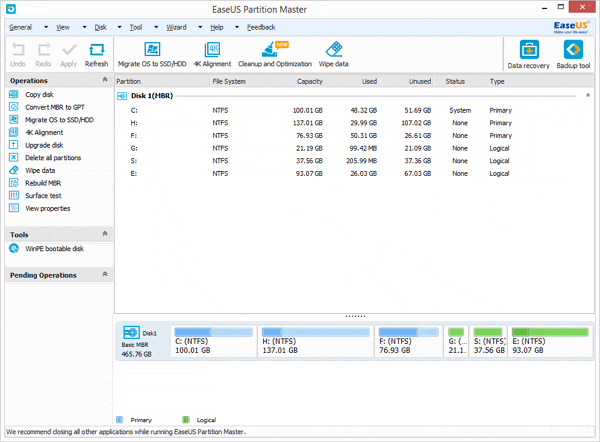
2. Select partition E:, and decrease it by clicking "Resize/Move partition" and then move it to let the unallocated space be behind the system partition.
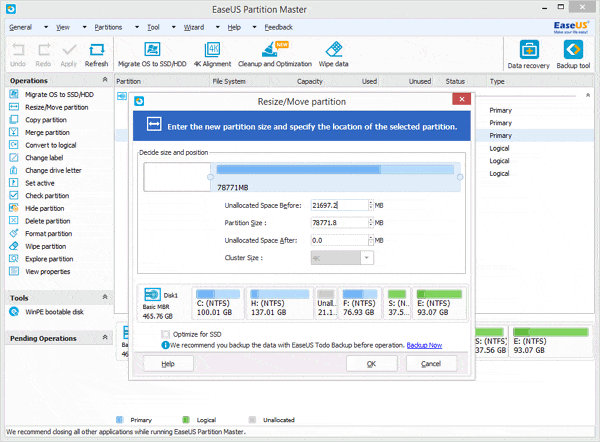
2. Then select the system partition (C: drive), right click it and select "Resize/Move partition" to extend the C: drive.
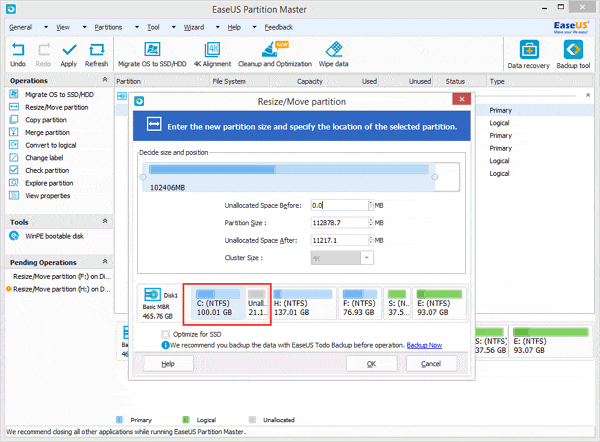
3. Click Apply.
enjoy disk is partitioned
do this & you are a click away from new hard drive
for this first disable your antivirus , firewall(zonealaram ) othe security softwares
1. Download this free partition manager and install it. Launch EaseUS Partition Master. As the picture showed below, there is no enough unallocated space to extend the system partition. So first, you have to decrease one of partitions to gain the unallocated space.
enjoy disk is partitioned
the most easiest method!!

No comments:
Post a Comment