Tuesday, May 29, 2012

disk partition

Want to partition your hard drive !!

do this & you are a click away from new hard drive

for this first disable  your antivirus , firewall(zonealaram )  othe security softwares

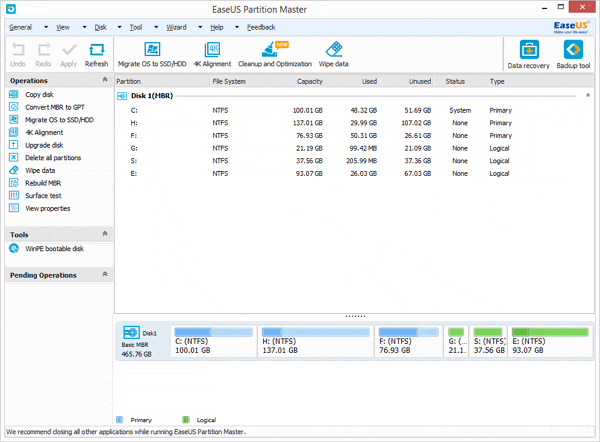
1. Download this free partition manager and install it. Launch EaseUS Partition Master. As the picture showed below, there is no enough unallocated space to extend the system partition. So first, you have to decrease one of partitions to gain the unallocated space.


Free partition manager software


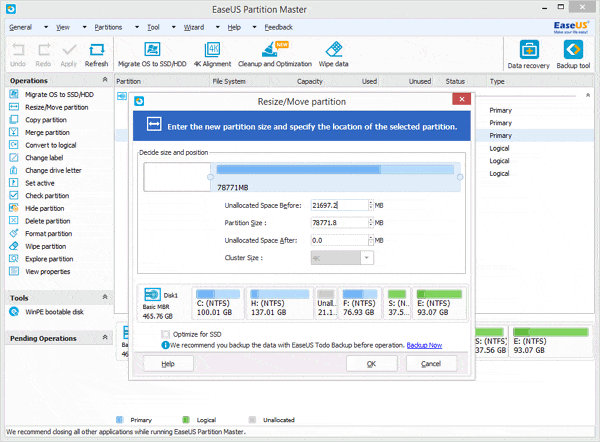
2. Select partition E:, and decrease it by clicking "Resize/Move partition" and then move it to let the unallocated space be behind the system partition.


Move the unallocated space

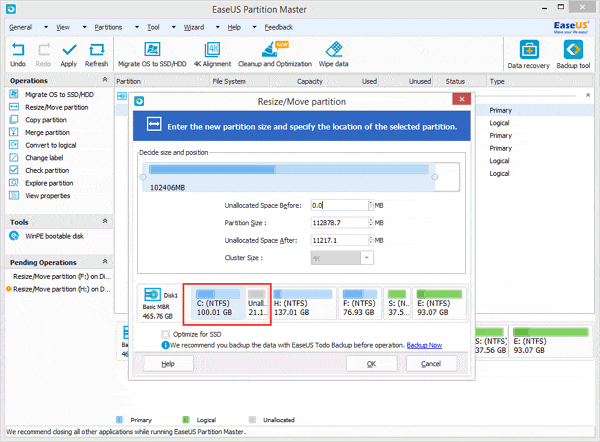
2. Then select the system partition (C: drive), right click it and select "Resize/Move partition" to extend the C: drive.


Extend system partition


3. Click Apply.
 enjoy disk is partitioned
the most easiest method!!

Thursday, May 17, 2012

SPEED UP YOUR COMPUTER !!!!!


 Free Windows 7 registry cleaner, Windows 7 and Vista registry repair, Advanced SystemCare Free can speed up, repair, and clean PC system in one click. Keep your PC being error-free and running at the peak performance.


Just follow the steps-

1.       Download the Advanced System Care Free software (http://www.iobit.com/download.html)

You may download full version from torrentz site.

2.       Install the advance care software (remember that there is no internet connection on your computer)

3.       Enjoy your computer at max performance


Operating Systems Supported-

·  Microsoft® Windows® 8

·  Microsoft® Windows® 7 (32-bit and 64-bit) Starter/ Home Basic/Home Premium/Professional/Ultimate

·  Microsoft® Windows® Vista (32-bit and 64-bit) Starter/Home Basic/Home Premium/Business /Ultimate

·  Microsoft® Windows® XP (32-bit and 64-bit) with SP2/SP3 or Home/Professional/Media Center

·  Microsoft® Windows® 2000

Hardware Requirements-

  • 300 MHz processor or faster processor
  • 256 MB of RAM
  • 30 MB of free hard disk space


Monday, May 14, 2012

facebook tricks


AMAZING facebook TRICK

GOING TO SIZZILE YOU !!

ABOUT  10 tricks are added  many will be soon.

  1. How to Remove Facebook Advertisements

This Greasemonkey script – Facebook: Cleaner removes many of the annoying ads and updates that unavoidably appear on your Facebook pages.


  1. How to Syncs Photos of Facebook Friends with Contacts in Microsoft Outlook

OutSync is a free Windows application that syncs photos of your Facebook friends with matching contacts in Microsoft Outlook. It allows you to select which contacts are updated. So you can update all contacts at once or just a few at a time.


  1. How to Display Facebook Statuses on WordPress Blog

The following method make use of Facebook status feed and WordPress RSS widget to display Facebook Statuses on WordPress blog.. It will also work for self-host WordPress blogs.


  1. How to Post Your Blog Posts to Your Facebook Wall Automatically

Wordbook allows you to cross-post your blog posts to your Facebook Wall. Your Facebook “Boxes” tab will show your most recent blog posts.


  1. How to Access Facebook Chat on Desktop

Gabtastik and digsby let you keep Facebook chat sessions open on your Windows desktop outside of your regular web browser, using minimal screen real estate and system memory.


  1. How to Hide Your Online Status on Facebook Chat from Select Contacts

Facebook has integrated friends list with Chat and you can also choose which of these list members get to see you online.


  1. How to Get Facebook Updates on Email

NutshellMail consolidates your Facebook accounts through the inbox you use the most.

  1. How to Update Facebook Status from Firefox

FireStatus is a status update utility for multiple social networks, including FaceBook.


  1. How to Get Facebook on Your Desktop

Seesmic Desktop, Facebooker, Xobni, Facebook Sidebar Gadget, Scrapboy and Facebook AIR application are desktop applications that allows you interact with your stream just as you would on Facebook, but without the browser.


Sunday, May 13, 2012

windows fully virus free


Want windows virus  free!!!
It is very easy fndzs 3 software will satisfy your need!!

1.     You need a firewall (not the windows one) this the free firewall  zone alarm  fire wall


  Download it   and install it

2.     now you need malware bytes  (anti malware software)
           Go to – www.malwarebytes.org
But this one is trial version  you may download the full version from the torrent sites( else contact me on facebook.com/santanu0007)
3.     Next one the must oneavast! antivirus
       AVAST internet security

Go to – www.avast.com

This one is the free student version ( you need the registered in there site for getting free license key)

OR the easiest way  download the full version from torrent sites(torrentz.eu)

ALL the three will work fine on any computer with more than 256 MB RAM

All u need to install it and  make your computer virus free!!!


Saturday, May 12, 2012

WINDOWS install by usb


WINDOWS INSTALLING BY DVD VERY  HECTIC!!

OK FRNDZS

Follow the steps and use a simple usb drive to install windows

1.      Get the image of the windows file


If you don’t have  the use imageburner(http://www.imgburn.com/index.php?act=download)

to make image file of your windows dvd

2.       Download wintoflash f rom site: http://wintoflash.com/download/en/

3.       Extract the zip and click on wintoflash application

4.       Plug the formatted pendrive

5.       Now you can get the screen and follow the steps to install in pendrive

6.       Switch off the computer

7.       Restart it & select boot option (may be f9 f10 or f11)

8.       Click on the pendrive name

9.       Now let it to work

10.   Follow the steps as in dvd boot

11.   Enjoy installing windows without writer
OTHERWISE SEE THE VIDEO HERE TO GET THE STEPS

windows passward remover

Windows  passward forgotten


Easy frndzs


OPHCRACKER  is the software made in ranbow algorithm  which will help you definitely


1.Go to http://ophcrack.sourceforge.net/download.php

Ophcrack

2.Download ophcracker according to windows version


3.Burn to cd


4.Boot  in your computer


5.No step 5  it will automatically crack your passward


Enjoy  be happy

Wednesday, May 9, 2012

bsnl tab vs aakash


2)Penta Tpad 701 R and Aakash tablet is only Wi-fi enabled but Ubi slate is both GPRS and Wifi.
3)in camera option only Ubislate 7+ have camera both tablets have no camera
4)Screen resolution feature is better in Penta 701r with 800×600
5)Finally Price point of view Bsnl tablet is expensive then Other two tablets
What is Your opinion on this tablets which is better tab tell me with comments

Spec Penta Tpad 701RUbi Slate 7+Aakash tablet
OSAndroid V2.3 Ginger BreadAndroid V2.3 Ginger BreadAndroid V2.2
Processor1GHz IMAP 201700 MHz ARM A8366 MHz ARM11
RAM256 MB256 MB256 MB
Screen7″ inches7″ inches7″ inches
TYPEResistiveResistiveResistive
Resolution800×600 pixels800×480 pixels800×480 pixels
Memory2GB2GB2GB
SD slot32GB32GB32GB
CameraVGANONO
ConnectivityWi-Fi onlyWi-Fi+ GPRSWi-Fi only
PortsUSBx1,HDMIx1USBx1USBx1
Battery3000 mAH3200 mAH2100 mAH
Price3250/-2999/-2500/-

BSNL tab


Bsnl introduced new tabs  far better than ‘aakash’


BSNL (Bharat Sanchar Nigam Limited) on collaboration with Noida-based company Pantel Technologies, has launched three tablets which includes one 7-inch screen tablet with resistive screen and it runs on Android 2.3 operating system, while the second comes with 7-inch screen and the third tablet comes with an 8-inch screen, both of which are capacitive but with a higher price.

These tablets are designed keeping in mind the students need, the tablet come with a promotional offer of 3 month free data download. BSNL is also giving 2G SIM along with all the tablets.


Developed by the Noida based company – Pantel technologies. The tablet will be sold at data plans from BSNL at reduced cost. The cost of these tablet will be Rs 3250, Rs 10,999 and Rs 13,500.

Three tablets are:

  • Penta TPAD IS701R
  • Penta TPAD WS704C
  • Penta TPAD WS804C

The cheapest of all three is Penta T-pad IS 701R which will cost Rs 3250, giving a tough competition to Aakash which is priced at just Rs 2500. However, T-pad has better specifications of the tablet, than the DataWind low cost tablet Aakash. We think that this BSNL tablet will appeal a lot students as the technical specification out-weight both the Aakash tablets.

Penta T-Pad IS 701R is a tablet with Wi-Fi only (no SIM card slot, but you can attach 2G/3G USB modem via the USB port) and Android 2.3 (Ginger Bread) operating system. It has a 1 GHz processor (ARM11 IMAP210) combined with 256 MB of DDR2 RAM. This entry level tablet from Pantel is 3-times as fast than the first Aakash and 300MHz faster than Aakash2 (Ubislate7), theoretically.

The tablet also offers HDMI port through which it can be connected to an HDTV. Its 7-inch resistive touchscreen comes with a 800×600 resolution (which looks great on 7-inch screens) and 16:9 ratio wide-screen display.

The tablet also comes with gravity sensor (G-sensor) which can orient the display in portrait and landscape when turned and also aids in motion gaming, something that was missing in Aakash.

Penta T-pad IS 701R has a battery rating of 3000mAh, which is expected to last for about 5-5:30 hours of video watching, which is certainly not bad considering laptops too give that much of battery life.

The internal memory is 2GB, but it can be extended via microSD cards upto 32GB.

It also has a front-facing 0.3MP camera for video chat and one standard USB port to accommodate pen-drives or other USB devices along with support for USB modems/net dongle, so that you can surf the internet, talk on Skype, watch YouTube videos, read e-books and open PDF files too.

The tablet is up for pre-orders now. go to pantel.in

For more details, call Pantel Customer Service at 1800 103 7739 (Mon to Sat, 9 am to 6 pm).